
Download YouTube thumbnails instantly in HD quality using a free 1-click YouTube Thumbnail Downloader. Fast, simple, and mobile friendly.

Have you ever scrolled through YouTube and seen a picture so cool that you wanted to save it?
That picture is called a thumbnail. Most of the time, we want to save these pictures for our own projects, as wallpapers, or just to look at them later.
But there is one problem: YouTube does not have a “Download” button for these pictures.
This is where a YouTube Thumbnail Downloader comes in. It is a simple tool that helps you get that image in just a few seconds.
In this long guide, we will learn everything about this tool, why it is helpful, and how you can use it like a pro.
What is a YouTube Thumbnail?
Before we talk about the tool, let’s talk about the thumbnail itself. Think of a thumbnail as a book cover.
When you go to a library, you look at the covers to decide which book to read. YouTube is the same way. A thumbnail is the small, still image you see before you click on a video.
YouTube creators spend hours making these pictures. They use bright colors, big text, and cool photos to make you curious. Because these pictures are so well-made, many people want to download them.
What Exactly is a YouTube Thumbnail Downloader?
A YouTube Thumbnail Downloader is a website or a tool that lets you grab the cover image of any YouTube video. You don’t need to be a computer expert to use it. You don’t even need to know how to code.
All you need is the link (URL) of the video. The tool looks at the link, finds the image hidden in the code of the page, and shows it to you so you can click “Save.”
Why Should You Use This Tool?
You might wonder, “Why can’t I just take a screenshot?” That is a good question! While you can take a screenshot, the quality is usually very blurry.
If you want a crisp, clear, and High Definition (HD) image, a downloader tool is much better.
Here are some common reasons people use this tool:
1. For Learning and Inspiration
If you are a new YouTuber, you want to know what works. By downloading thumbnails from famous creators, you can look at them closely.
You can see what colors they use and where they put their text. This helps you learn how to make better designs for yourself.
2. For Blog Posts and Guest Articles
If you are writing an article about a specific video or a famous person, you need a good picture.
Using the actual thumbnail of the video makes your article look professional and honest.
3. For Social Media Sharing
Sometimes you want to share a video on Instagram or Facebook, but the automatic preview doesn’t look good.
By downloading the HD thumbnail, you can upload it manually and make your post look amazing.
4. Creating Wallpapers
Many music videos or travel channels have breathtaking thumbnails. They look like professional photography. Many fans download these to use as backgrounds for their phones or laptops.
How to Use a YouTube Thumbnail Downloader (Step-by-Step)
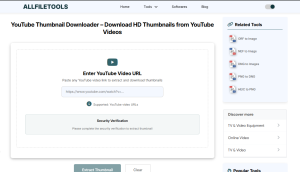
Using this tool is as easy as eating a cookie! Here is exactly how you do it:
Step 1: Open your browser and go to a trusted site like AllFileTools.com. And use this Tool YouTube Thumbnail Downloader
Step 2: Copy the URL (link) of the YouTube video you want the thumbnail from.
Step 3: Paste the link into the “Enter YouTube URL” box on the tool page.
Step 4: Click the “Get Thumbnail” button and wait for the images to appear.
Step 5: Click the “Download” button next to the HD quality option to save the file.
Different Types of Thumbnail Qualities
Not all thumbnails are the same size. When you use a downloader, you usually see these options:
- HD Quality (1280×720): This is the best one. It is very clear and looks great on big screens.
- SD Quality (640×480): This is standard quality. It is good if you want to save space on your phone.
- Normal Quality (480×360): This is a medium-sized image.
- Small/Player Background (120×90): This is a tiny version, like a little icon.
Is it Free to Use?
Yes! Most YouTube Thumbnail Downloader tools are 100% free. You do not have to pay money, and you do not have to give your credit card details.You can download one thumbnail or a hundred thumbnails—it doesn’t matter!
Read: YouTube Creator Academy: Thumbnail Best Practices
Features of a Great Thumbnail Downloader
If you are looking for the best tool, make sure it has these features:
- No Registration Needed: You should not have to “Sign Up” or “Log In.” A good tool lets you work immediately.
- No Watermarks: The image should be clean. There shouldn’t be any extra text or logos on the picture.
- Fast Loading: The tool should show you the results in one or two seconds.
- Mobile Friendly: Since most people use phones, the tool should work perfectly on Chrome, Safari, and other mobile browsers.
Important Things to Remember (The Rules)
Even though downloading is easy, there are some rules you should follow to be a good “internet citizen.”
- Copyright: The person who made the video owns the image. You can use it for your own fun or for learning. But if you try to sell the image or use it to trick people, you might get into trouble.
- Be Nice: Don’t use someone’s thumbnail to say mean things about them.
- Don’t Copy Exactly: If you are a creator, use the downloaded image to learn, not to steal. Make your own design that is inspired by theirs!
Troubleshooting: What if it Doesn’t Work?
Sometimes, you might paste a link and see an error. Don’t worry! Here is why that might happen:
- Wrong Link: Make sure you copied the whole link. If even one letter is missing, the tool won’t find the video.
- Private Video: If a video is set to “Private,” the tool cannot see the thumbnail. It only works for “Public” videos.
- Internet Connection: Sometimes your internet might be slow. Try refreshing the page.
Conclusion
The YouTube Thumbnail Downloader is a powerful but simple tool. It bridges the gap between YouTube and your device.
Whether you are a student, a designer, a blogger, or just a fan, this tool saves you time and gives you the highest quality images possible.
Next time you see a thumbnail that catches your eye, don’t just let it go. Copy the link, use the downloader, and save that piece of art!
- Explore more powerful file conversion and online utilities at AllFileTools –
- For technical support, digital solutions, and expert services, visit LetDigitalFly IT Services
- Discover additional career and productivity resources at Resume Slip Builder.
Looking for a quick way to download video thumbnails? Use a trusted YouTube Thumbnail Downloader today and save crisp HD images from any public video in seconds.
